
Choosing the right microcontroller (MCU) is one of the most critical decisions in embedded systems design. It directly influences system performance, cost, power consumption, scalability, and even long-term maintenance. For students and beginners, this decision can seem overwhelming because of the vast number of options available in the market—from simple 8-bit controllers to powerful 32-bit systems-on-chip.
Let me walk you through this in a structured and practical way, so you can develop a clear, engineering-oriented approach rather than relying on guesswork.
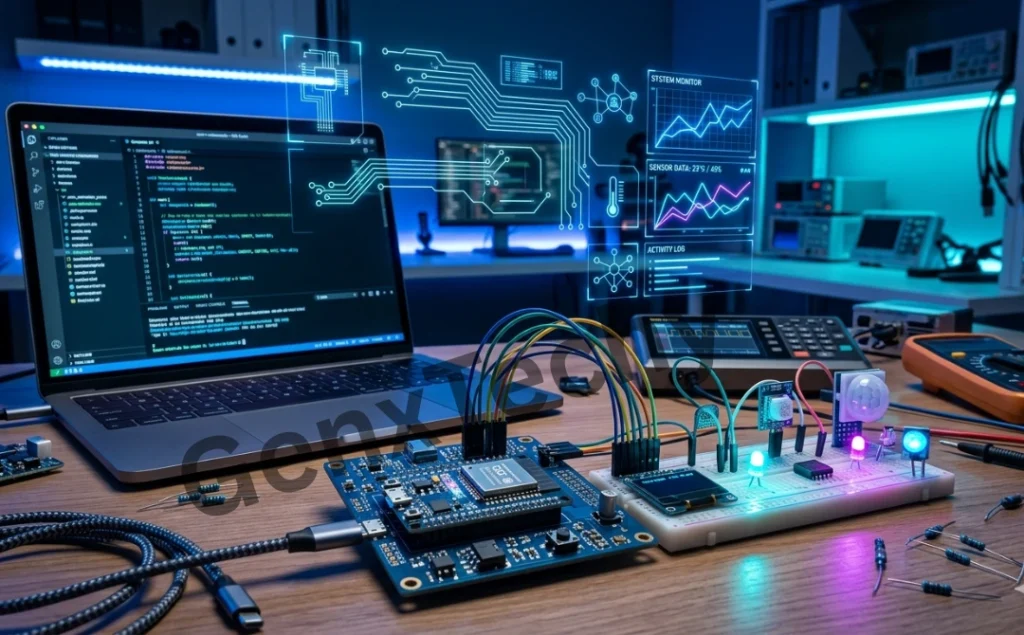
Fig. 8.1: Embedded System Design
1. Understand the Application Requirements First
Before even looking at datasheets or brands, you must clearly define what your system needs to do. This is the foundation of microcontroller selection.
Ask yourself:
- What is the purpose of the system?
- What inputs and outputs are required (sensors, actuators, communication modules)?
- Is the system real-time?
- What level of accuracy and speed is needed?
For example:
- A simple temperature monitoring system may only require an 8-bit MCU.
A robotic control system with image processing may require a 32-bit MCU or even a microprocessor.
Important Note:
This stage is often called requirement analysis, and skipping it leads
to either overdesign (wasting cost) or underperformance.
2. CPU Architecture and Processing Power
Microcontrollers come in different architectures:
- 8-bit (e.g., 8051, AVR): Suitable for simple control tasks.
- 16-bit (e.g., MSP430): Balanced performance and power efficiency.
- 32-bit (e.g., ARM Cortex-M series): High performance, widely used in modern systems.
Key parameters to consider:
- Clock speed (MHz)
- Instruction set efficiency
- Processing capability (MIPS)
If your application involves:
- Signal processing → choose higher-bit architecture
- Simple logic control → lower-bit is sufficient
Important Note:
Higher performance also means higher power consumption and cost, so always match performance to actual need.
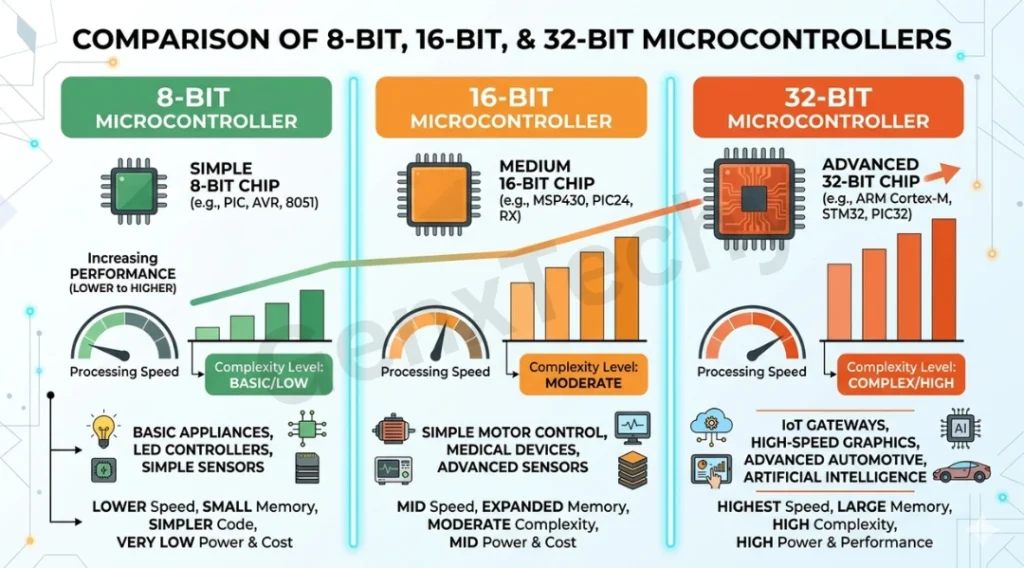
Fig. 8.2: Comparative study of different microcontrollers
3. Memory Requirements
Microcontrollers typically include:
- Flash memory → program storage
- RAM → runtime data handling
- EEPROM (optional) → non-volatile data storage
You must estimate:
- Program size
- Data storage needs
- Stack and buffer requirements
For example:
- A simple LED controller may need only a few KB of Flash.
- An IoT device with communication stacks may require hundreds of KB or even MB.
Rule of thumb:
Always select slightly more memory than your estimate (20–30% margin) to accommodate future updates.
4. Input/Output (I/O) Requirements
The number and type of I/O pins are crucial.
Consider:
- Digital I/O pins
- Analog inputs (ADC channels)
- PWM outputs
- Interrupt pins
If your system includes:
- Multiple sensors → need ADC channels
- Motor control → need PWM outputs
- External events → need interrupts
Also consider:
- Pin multiplexing capabilities
Electrical characteristics (voltage levels, drive strength)
5. Peripheral Requirements
Modern microcontrollers come with built-in peripherals that reduce the need for external components.
Common peripherals include:
- ADC (Analog-to-Digital Converter)
- DAC (Digital-to-Analog Converter)
- Timers/Counters
- UART, SPI, I2C communication interfaces
- USB, CAN, Ethernet (advanced MCUs)
Selecting a microcontroller with the required peripherals:
- Reduces hardware complexity
- Saves cost
- Improves reliability
For instance:
- An IoT system may require Wi-Fi or SPI for communication.
- An automotive system may require CAN bus.
6. Power Consumption
Power consumption is a critical factor, especially for battery-operated systems.
Microcontrollers offer different power modes:
- Active mode
- Sleep mode
- Deep sleep/standby mode
You should evaluate:
- Operating voltage (e.g., 1.8V, 3.3V, 5V)
- Current consumption in different modes
Applications like:
- Wearables
- IoT sensors
require ultra-low power MCUs (e.g., MSP430, ARM Cortex-M0+).
Engineering trade-off:
Higher performance usually means higher power consumption.
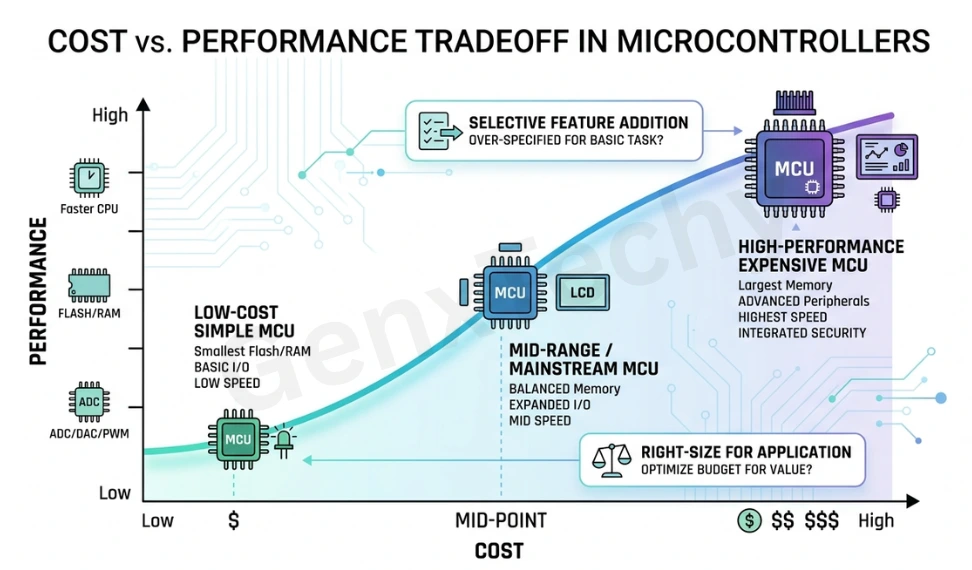 Fig. 8.3: Cost and Performance tradeoff in selecting microcontrollers
7. Real-Time Requirements
Some embedded systems must respond within strict timing constraints.
Examples:
- Automotive control systems
- Industrial automation
- Medical devices
For such systems, consider:
- Interrupt latency
- Real-time operating system (RTOS) support
- Deterministic execution
ARM Cortex-M series, for example, are widely used in real-time applications due to their predictable interrupt handling.
8. Development Tools and Ecosystem
Even the best microcontroller becomes difficult to use without proper development support.
Check for:
- Availability of IDE (Integrated Development Environment)
- Compiler support (GCC, proprietary)
- Debugging tools (JTAG, SWD)
- Simulation support
Popular ecosystems:
- Arduino (easy for beginners)
- STM32CubeIDE (professional development)
- MPLAB (Microchip)
A strong ecosystem significantly reduces development time.
9. Cost Considerations
Cost is always a practical constraint, especially in large-scale production.
Consider:
- Unit price of the MCU
- Cost of supporting components
- Development cost
For student projects:
- Low-cost development boards are ideal
For industrial products:
Even a ₹10 difference per unit matters at scale
10. Availability and Vendor Support
Always ensure that the microcontroller:
- Is readily available in the market
- Has long-term availability (important for industrial products)
- Has strong technical support and documentation
Reliable vendors include:
- Microchip
- Texas Instruments
- STMicroelectronics
- NXP
Good documentation (datasheets, application notes) is invaluable.
11. Scalability and Future Expansion
Think beyond the current design.
Ask:
- Will the system need upgrades later?
- Will additional features be added?
Choosing a scalable MCU family (e.g., ARM Cortex series) allows easy migration without redesigning the entire system.
12. Package and Physical Constraints
Microcontrollers come in various packages:
- DIP (easy for prototyping)
- QFP, QFN (compact, used in production)
Consider:
- PCB size constraints
- Ease of soldering
- Thermal performance
For students:
DIP or development boards are preferable
13. Security Features
In modern embedded systems, especially IoT, security is critical.
Look for:
- Hardware encryption (AES, RSA)
- Secure boot
- Memory protection
This is essential in applications like:
- Banking devices
- Smart home systems
- Industrial IoT
Example-Based Selection Approach
Let’s understand with a simple example:
Case 1: Smart Home Temperature Monitoring System
Requirements:
- Temperature sensor input → ADC required
- Wi-Fi communication → SPI/UART needed
- Low power → battery operation
Suitable MCU:
- ARM Cortex-M0/M3 with ADC + communication peripherals
Case 2: Industrial Motor Control
Requirements:
- PWM outputs
- Real-time response
- High reliability
Suitable MCU:
- DSP-based MCU or ARM Cortex-M4
| S.No. | Selection Factor | What to Consider | Why It Matters | Example / Insight |
|---|---|---|---|---|
| 1 | Application Requirements | Purpose, inputs/outputs, real-time needs | Defines entire system design | Simple sensor → 8-bit MCU; Robotics → 32-bit MCU |
| 2 | CPU Architecture | 8-bit, 16-bit, 32-bit, clock speed, MIPS | Determines processing capability | ARM Cortex for high performance |
| 3 | Memory Requirements | Flash, RAM, EEPROM size | Ensures program and data storage | IoT devices need large Flash memory |
| 4 | I/O Requirements | Digital pins, ADC, PWM, interrupts | Enables interfacing with devices | Motor control requires PWM |
| 5 | Peripherals | ADC, DAC, UART, SPI, I2C, CAN | Reduces external components | CAN needed in automotive systems |
| 6 | Power Consumption | Voltage, current, sleep modes | Critical for battery devices | Wearables need ultra-low power MCUs |
| 7 | Real-Time Capability | Interrupt latency, RTOS | Ensures timely response | Industrial automation needs real-time |
| 8 | Development Tools | IDE, compiler, debugger | Simplifies development | Arduino for beginners |
| 9 | Cost | Unit price, system cost | Affects scalability | ₹10 difference matters at scale |
| 10 | Availability & Support | Market availability, documentation | Ensures long-term reliability | Strong vendor support reduces risk |
| 11 | Scalability | Future upgrades, expansion options | Avoids redesign in future | ARM family allows easy upgrades |
| 12 | Package Type | DIP, QFP, QFN | Affects PCB design | DIP easier for students |
| 13 | Security Features | Encryption, secure boot | Protects system/data | Essential for IoT & banking |
Quick Decision Table (For Beginners)
| Application Type | Recommended MCU Type | Key Features Needed |
|---|---|---|
| Simple Projects (LED, Sensors) | 8-bit MCU | Low cost, basic I/O |
| IoT Devices | 32-bit MCU | Wi-Fi/SPI, low power |
| Wearables | Ultra-low power MCU | Sleep modes, low voltage |
| Industrial Control | 32-bit / DSP MCU | Real-time, PWM, reliability |
| Robotics | 32-bit MCU | High speed, multiple peripherals |
Common Mistakes to Avoid
Students often make these errors:
- Choosing overly powerful MCUs (wastes cost and power)
- Ignoring power consumption
- Not checking peripheral availability
- Overlooking toolchain support
- Not planning for future scalability
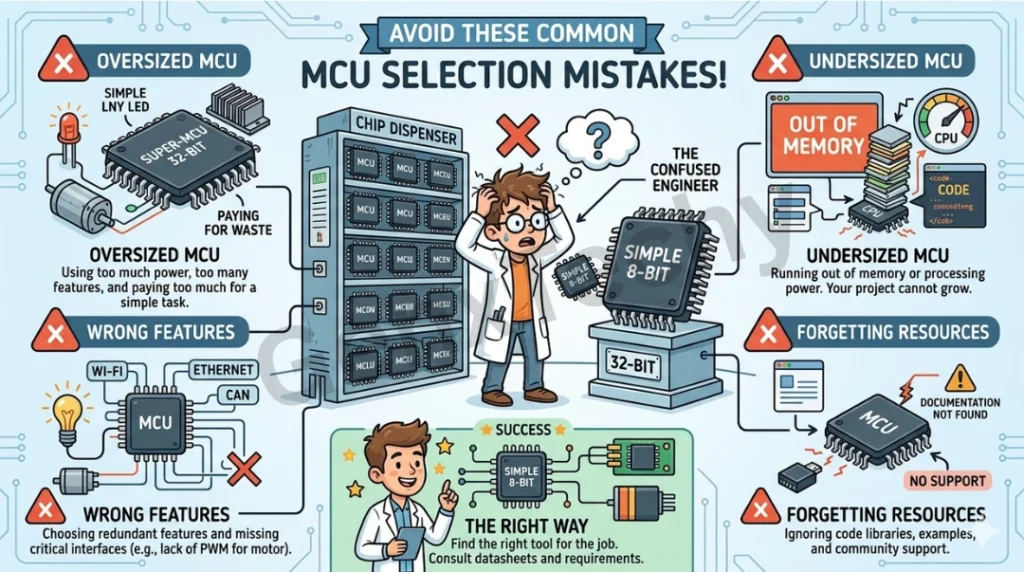
Fig. 8.4: Common mistakes while selecting a Microcontroller
Avoiding these mistakes improves both design efficiency and learning outcomes.
Choosing a microcontroller is not about selecting the “best” one—it is about selecting the most appropriate one for your specific application.
A systematic approach involves:
- Understanding application requirements
- Matching processing power
- Evaluating memory and peripherals
- Considering power, cost, and scalability
- Ensuring strong development support
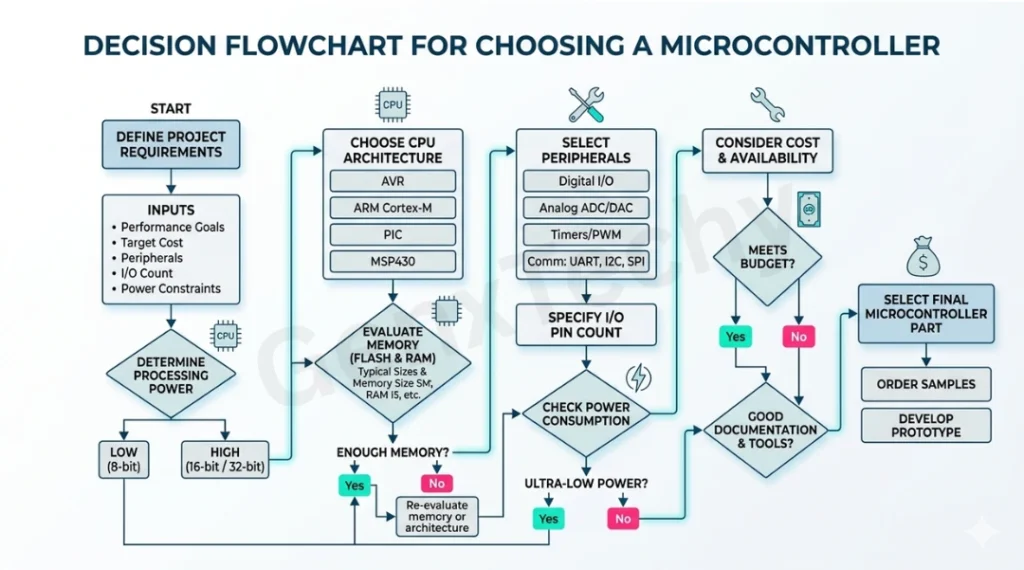
Fig. 8.5: Flowchart for selecting a Microcontroller
For students, this process is not just about design—it is about developing engineering judgment. With practice, you will begin to intuitively match applications to microcontrollers based on constraints and performance needs.